A Funky VJ Toolbox

DiscoCast Visualizer is a live visual performance studio for macOS and Windows. Featuring 1,144 reactive and editable MilkDrop presets, a no-code visual builder where you can mix custom visualizations, images, video, transparent video layers, animated GIFs, and text - all with audio reactivity - plus a scripted show sequencer, all in one app.

What's new

Version 0.9 · Oct 12, 2026

  • Clean projector output (macOS) - Press O, pick your projector or second screen, and hit Send: the visuals go full-screen there, and all your controls stay on your laptop. Smooth 1080p at 30 fps, in time with the music.
  • No more freezes - The visuals keep running when you switch to another app (your DJ software, a browser) on top of DiscoCast. Presets with custom shapes no longer freeze auto-cycle. And one bad frame can never stop the show again.
  • Long mixes load instantly - A 2-hour audio file now starts playing in under a second (it used to take about 25 seconds), and jumping around in it is instant.
  • Redesigned Output panel - Your screens show as buttons, with one clear Send / Stop button and a Fullscreen switch.
  • Bug fixes - Your display can sleep again after you quit the app.

Beta Oct 11, 2026

  • Smooth switching into video presets - Switching to a preset with a video layer no longer pauses the visuals. The video is ready before the switch happens, and Next and auto-cycle load the upcoming preset ahead of time, so the change is instant. The Timeline loads each block's video a few seconds early, too. Long sessions stay smooth: videos from earlier presets no longer keep running in the background.
  • Video import works offline - Adding a video to a layer in the Preset Studio no longer needs an internet connection.
  • Bug fixes - Importing a preset file now clearly lists a preset that couldn't be imported, instead of bringing it in incomplete.
Earlier updates
  • Lock a preset - Random remixes ITS look - Found one of the 1,144 bundled presets you love but want endless variations of it? Open Locks and hit Lock preset: now the Random button stops jumping to a brand-new preset and instead re-moods the one you're on - fresh colour, contrast, grade reactivity, Scene FX, and Club finish on every press, all pulsing to the music - while its motion stays exactly the same. It turns any preset into an endlessly explorable look: the same addictive doom-scroll as browsing, but focused on a preset you've chosen. Unlock and Random browses fresh presets again.
  • Layers on bundled presets - calmer, and they stick - Image, video, GIF, and text layers now sit still by default over a MilkDrop preset instead of riding its motion (flip on a layer's own audio sliders when you want it to react), Blend modes apply cleanly to bundled presets, and your layers now persist when you press Random - drop in a logo or clip and browse presets underneath it without it disappearing.
  • Meld - your image, melted INTO the preset - On any image, GIF, or video layer, hit Meld and that picture is fed straight into the preset's own engine - it gets melted, tunneled, kaleidoscoped, and pulsed to the music instead of just sitting on top as an overlay. A logo dissolves into plasma; a face melts through a tunnel on the beat; a photo becomes liquid. Dial the look with Flow (the melt motion), Size & Position, Mirror / Kaleido, Speed (down to gorgeous slow-motion), Luma Key, Blend mode + Colour grade, beat-reactive Spin / Zoom / Flow Pulse, and now two new melding tools - Mask (use the image's bright shape as a crisp stencil, so a logo or text gets filled with the swirling preset) and Displace (the image's shape physically ripples and embosses the melt). Remix gambles the whole melt for you. Works with still images, GIFs, and video.
  • Club / Dark Room - one-knob dark-venue tune - The go-to control for taming any preset for a club or dark room. Instead of just dimming everything, it detects blown-out white (the kind that lights up the room) and crushes that specifically, while pushing the remaining colour deeper, not dimmer - so whites collapse toward dark but the reds, blues, and greens get richer. One Club slider, a one-tap Club it button, and it works on all 1,144 bundled presets too.
  • Community Packs + unlimited presets - Click Import to browse and one-click install extra preset packs - ships with Extras Vol. 1–3 (750 more full-fidelity, shader-intact MilkDrop presets). Find them by typing the pack name in any search box; remove anytime. Under the hood, custom-preset storage moved to IndexedDB (with a native-filesystem mirror in the app), so the old "Storage full" limit is gone - save as many custom presets as you like.
  • Preset Studio - One-click Remix + audio-reactive Color adjustments - The footer Remix button now rolls an entire preset in one press - a moving colour-field background, three contrasting colours, a motion, a flow, and a wave, all pulsing to the audio - so no two ever look the same. Open Remix locks to pin the parts you love (Colours / Field / Motion / Flow / Reactivity) and re-roll only the rest, turning the dice into a real compositional tool. And new Color adjustments - Brightness / Contrast / Gamma / Temperature - re-mood the final output of any loaded preset (including all 1,144 bundled), with a Color Reactivity panel that makes them pulse to the beat: load a preset and it breathes with the music. Plus a Scene FX rack - Bloom / Posterize / Vignette / Scan lines / Film grain - to finish any preset with a soft-glow, graphic, cinematic, or retro look.
  • Preset Studio - Color Field + Flow Style - From-scratch presets no longer look like one thin spinning line on a flat colour. The new Color Field turns the background into a living, moving multi-colour field - it takes Shift's signature A→B colour blend (the dance/VJ pulse) and spreads it across the screen as any of 22 styles (Linear, Stripes, Weave, Radial, Diamond, Moiré, Conic, Spiral, Rays, Vortex, Mandala, Plasma, Clouds, Marble, Ripples, Checker, Hex, Chevron, Dots, Grid, Caustics - plus Flat), each with Scale / Motion / Spin / Sharpness / Warp (an organic ripple over any pattern), an optional 3-colour blend, and a beat-reactive field, still beating to the audio. A separate Background colour keeps the field distinct from the content on top, so the roll lands contrasting-but-harmonious colours instead of one flat tone. And Flow Style adds a per-preset motion field - Tunnel / Spiral / Ripple / Swirl / Plasma / Liquid / Kaleido - with Speed, Depth, and a Density dial that fills the screen. Together they give a blank canvas real depth, colour, and variety.
  • Preset Studio - Color Studio - The Palette tab's Colors button now leads a full colour generator. Hit for a complete random scheme, or steer it: pick a harmony rule (Monochrome / Analogous / Complementary / Split-complement / Triadic), a tone (Vivid / Neon / Pastel / Deep), and a Base Hue - any combination, or none for pure random. Chips toggle (click again to clear) and the dice lights up whatever it landed on. A Color Roll slider slowly cycles the whole scheme's hue over time, in solid and feedback presets. And Glow / Accent Strength now paint a real coloured bloom - a soft halo around the visuals tinted by your Glow / Accent colour - so all three palette colours finally show on the visualisation itself, not just as an edge border. Everything respects your per-channel colour locks.
  • Preset Studio - Build From Scratch: Motion Engine · Custom Shapes · Colour Roll - A new wave of from-scratch creation tools, so a blank canvas isn't limited to a handful of looks. The Motion tab now opens with a Motion Engine - pick Breathe (pulsing zoom), Sway (drifting centre), or Spin (rocking rotation) and dial Speed + Depth to give a preset living, evolving motion instead of a frozen snapshot. The Wave tab gains Custom Shapes - place up to four polygons/rings, each with a drag XY-pad, Size, Sides (triangle → circle), Angle, Opacity, Fill / Border / Glow, a per-shape Motion (Spin / Orbit) and a full Reactivity panel (Source + Curve + Size / Opacity / Spin / Shake / Sides, each with its own source pill), plus a Trail control from crisp (no trail) to long echoes; shapes render over the feedback presets and over a flat Solid/Shift background. And the Palette tab gets a Colors button that rolls a harmony-aware random scheme (complementary / analogous / triadic / split / monochrome) while respecting your channel locks. All of it plays live in the player and timeline.
  • Beat-Reactive Layer Effects - 5 new - The per-layer Audio Reactivity panel grows from five effects to ten. Joining Pulse, Bounce, Shake, Beat Fade, and Strobe: Tilt (snap-rotate ±15° on the beat, with a ←/→ direction chip), Hop (a directional left/right kick - the sideways cousin of Bounce), Hue Pulse (the layer's colour jumps on every beat, riding on top of any Hue Spin), Blur Pulse (a cinematic focus pull - blurs on the hit, snaps sharp between), and Squash (cartoon squash-and-stretch - Wide flattens horizontally, Tall stretches up). Every one rides the same Source (Bass / Mid / Treble / Volume / Flux) and Curve (Linear / Squared / Cubed / Gate) as the existing effects, on image, video, GIF, and text layers alike.
  • Layer Animation - Entrance / Exit / Idle / Timing - Every image, video, GIF, and text layer now has a Animate button that opens a focused modal - a creative planning tool for how each layer arrives, leaves, and breathes on screen. Three tabs: Entrance (Fade, Scale Up / Down, Slide L/R/U/D, Pop, Blur - auto-fires on preset load), Exit (same chip set with mirrored end-states, plays when the layer is removed), and Idle (Float, Pulse, Sway, Spin, Drift, Breathe - continuous motion with a speed multiplier). Duration is a custom visual scrubber with tick marks; ease is a chip row with a live SVG curve preview that samples the actual ease so elastic and bounce overshoots draw correctly. Each preset reveals one contextual parameter (Distance, Start size, Pop from, Start blur) so the controls morph to the choice instead of a fixed form. The modal is a draggable floating panel - the canvas stays live behind it while you tune. New: Enter at / Exit at time scrubbers (0:00–3:00) let you schedule exactly when each layer enters and exits within the preset's lifetime - stagger five layers for a cinematic reveal. All animations play live in the player and timeline, not just in the editor.
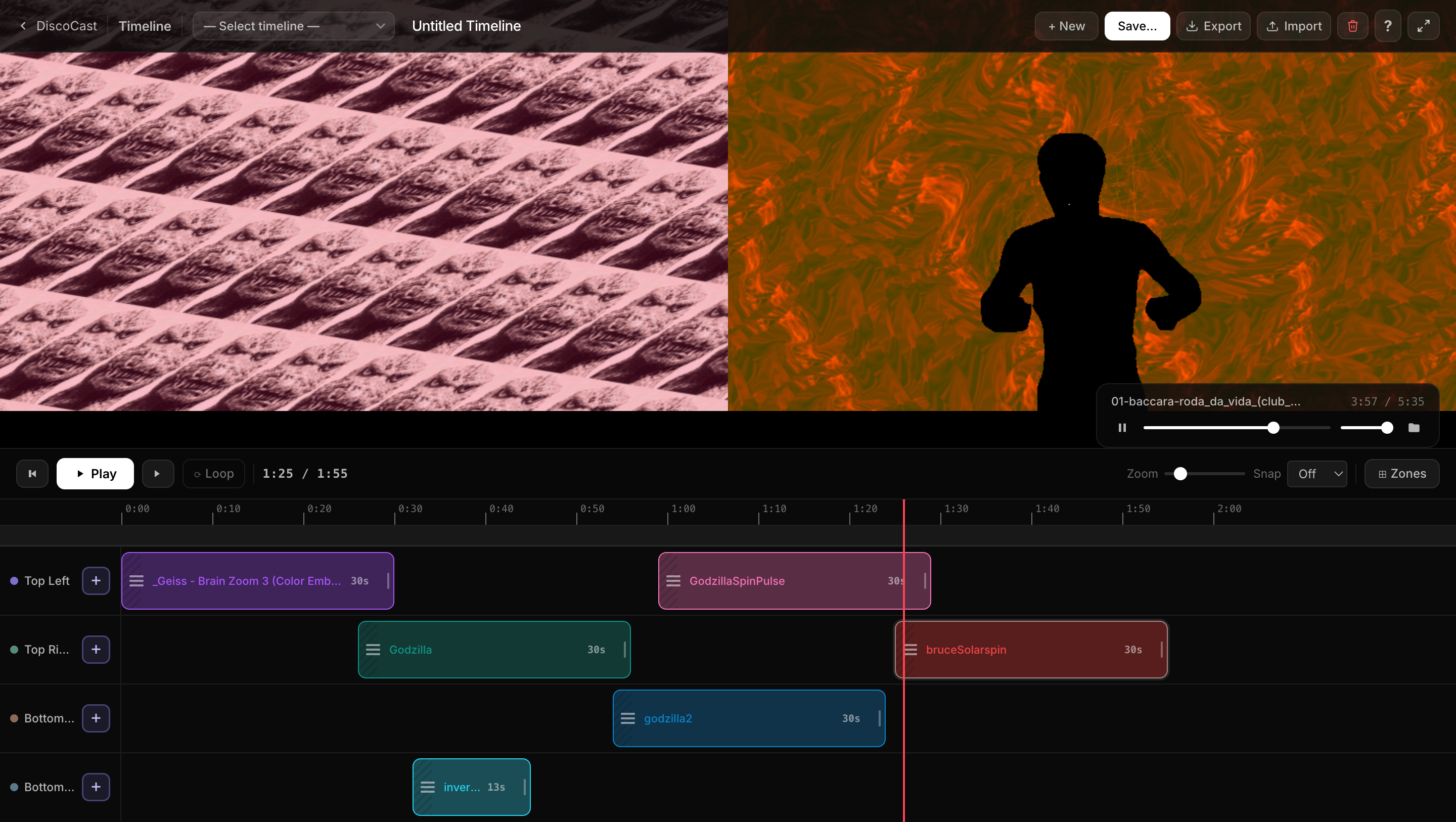
  • Timeline - Multi-Track Stacking - Stack multiple presets inside a single zone - the Timeline is now a real layer compositor. In Full Screen, the transport row's + Add Track button drops a new track on top of the stack (up to 4 deep). In Left/Right, Quadrants, and the other multi-zone layouts, each zone gets its own inline + Track button on its front-layer row - no extra strip rows wasted. Strip order is Photoshop-style: top row = front layer, so the strip reads like the composite. Added tracks default to transparent gaps (empty space reveals the track beneath instead of painting black), and paired with a Transparent Background preset, the upper preset's own transparent pixels reveal beneath too - true per-pixel layer compositing. Output routing is per zone: one ▸ chip on each zone's foundational row picks the display for every track in that zone, and stacked zones expose per-track blend mode + opacity in the Outputs panel.
  • Aspect Lock - layers hold their shape - Every image, video, GIF, and text layer now has an Aspect control, set to Lock by default: the layer keeps its true shape on any canvas, so resizing the window or going full screen reveals more of the scene instead of stretching it. Flip to Fluid for the old canvas-adaptive behaviour. Single, tiled, and grid layers are all covered - and the editor canvas no longer distorts when you hide the panel for a full-width preview.
  • Transparent Preset Backgrounds - Timeline Stacking - A whole preset can now go fully transparent, not just a single layer. Flip Show layers only + Transparent background in the Studio and your image, transparent-video, GIF, and text layers float on a see-through canvas. The payoff is in the Timeline: drop a transparent preset on a zone stacked over another and the lower zone shows through - real per-pixel layer compositing (e.g. a rotoscoped subject or a logo over a full-screen MilkDrop preset). Verified on web, macOS, and Windows with both image and transparent-video layers.
  • Preset Studio - Remix Family + Wave Engine Fork - The Studio used to always start from a blank slate. Now it has a Random button in a redesigned icon footer that one-clicks a random preset from the full 1,144-preset library straight into the Studio as your editing base - taking the variety from a dozen surface combinations to 1,144 starting points. Click it again to reroll. The footer is now five big Material-Symbols icon buttons with instant tooltips: + New, Random, Remix (renamed from Surprise - same one-click re-roll of palette + motion + wave on whatever's loaded), Save, ↺ Reset. The Wave tab also gets real engine upgrades via a vendored fork of Butterchurn: a continuous Thickness slider (0–8) replaces the old on/off toggle (smoothly scales the wave line from hairline to bold), a new Fill slider (0–1) fills the wave into a broad shape - a pulsing disc on the round modes, a solid wedge on the line modes - so it reads as a solid form instead of a thin thread (the value also sets the fill opacity), and a new Rotation slider (±180°) spins the wave shape around its own anchor. All apply to every shape mode including Ripple, all compose cleanly with the existing Reactivity panel, and double-click on any slider label resets it to its default.
  • Preset Studio - MilkDrop Editor Upgrade - A pass over every MilkDrop control to make the Studio actually fun to use. The 12 Quick Palettes now hover-to-preview live on the canvas, paint colors only (no more sneaky border state), and each color channel has a lock so you can remix the glow while keeping your wave color. + Save current mix pins your favourite triplet as a 13th chip. New Glow Strength and Accent Strength sliders drive border alpha + size together as one "loudness" axis. The Motion tab opens with six one-click Motion Presets (Vortex / Calm Drift / Earthquake / Tunnel In / Spin Lock / Hyperspace) and a ↺ Reset button beside them so you can always go back. The Wave tab gets a parallel Reactivity panel - Source + Curve + Size / Opacity / Shape / Orbit - with a tiny src pill next to each slider that lets you override the source per-slider (bass pumps wave size while treble morphs shape). A ↺ Reset on the Shape grid hides the wave entirely so nothing looks "selected" until you actively pick a shape. A Surprise button in the footer rolls a coherent random variation + palette + motion + wave in one click. And double-click any slider label snaps it back to its default value.
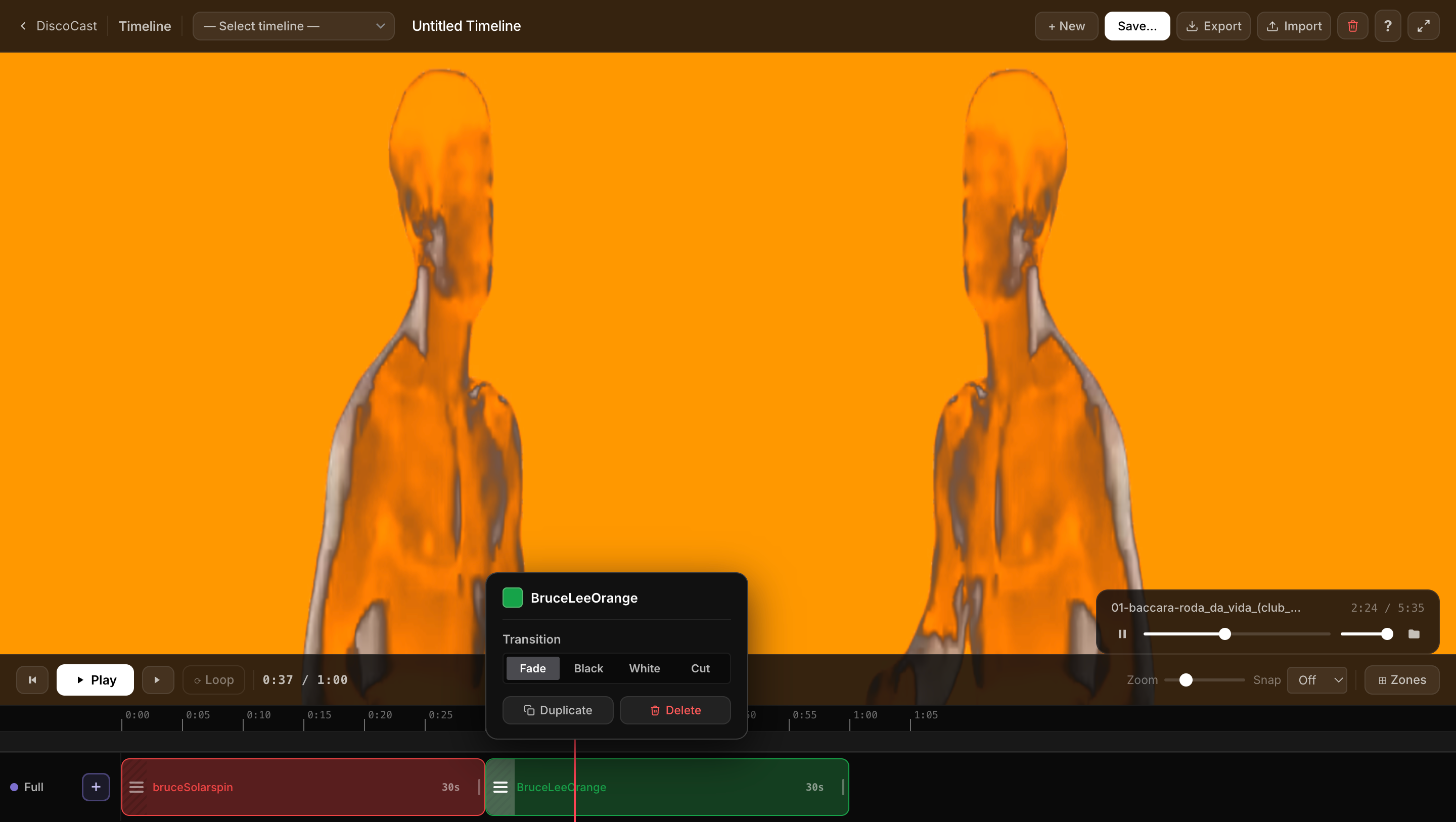
  • Timeline Editor - Block Transitions - Every block now has a Transition picker in its ☰ menu: Fade (crossfade from the previous preset), Black or White (dip through that colour), or Cut (instant switch) - a creative choice per block. Resizing is smoother too: the timeline strip auto-scrolls while you drag a block's edge, so you can stretch it to any length in one motion instead of drag-release-scroll over and over.
  • Timeline Editor - Loop Regions - Markers are now real loopers. Press M (or click the new dedicated marker lane) to drop a marker, set its action to Loop, and it becomes a draggable loop region: drag the band's handles to size it and playback loops that span, easing across the wrap with a 1-second crossfade. The per-block menu is now a clean action menu with a 16-colour block colour picker, and a playhead fix means adding a preset no longer jumps the canvas - the playhead is the single source of truth. Still in active development alongside multi-zone compositing, transport, and VJ mode.
  • Recursive grids - A Grid-mode layer can now nest. Subdivide splits every grid cell into an inner sub-grid, and Outer Gap opens wide channels between the outer cells so the sub-grids read as separate clusters - a grid-within-a-grid from a single layer. Pairs with Spacing for two independent gap scales, and every per-cell effect varies across every inner cell automatically.
  • Grid mode for tiled layers - Switch any tiled image, GIF, or text layer from density tiling to an explicit Cols × Rows grid that fills the canvas. Choose Fill (stretch the image to each cell) or Fit (keep its aspect, transparent pad), and a Scale control zooms the whole grid - pull it in with a margin, or push it past the canvas edge for tight, kaleidoscope-style compositions. Every per-cell effect and audio reaction carries over.
  • Per-Cell tile controls - On any tiled image, GIF, or text layer: Offset staggers alternating rows or columns for a brick / half-drop pattern, Cell Rotate gives each tile its own random rotation (with optional 90° snap for a Truchet-style mosaic), and Popcorn drives a per-cell audio pulse so individual tiles dance on different beat phases. New Variance sliders - Size Var, Jitter, and Opacity Var - give every tile its own size, position, and opacity; with scatter sampling, jittered tiles break free of the grid, drifting past their cell boundaries and overlapping each other for organic, scattered layouts. A Seed control reshuffles the random pattern. Composes with the existing Spin, Group, and Angle.
  • Transparent Video Layers - Drop a WebM with an alpha channel (e.g. an AI-rotoscoped subject from Sammie Roto) and the subject floats over the visualizer with full transparency. Works on web, Windows, and macOS (Mac auto-converts on first import). All VJ effects, audio reactivity, and motion controls apply to every frame.
  • Various bug fixes

What's in the app

Over 1,100 reactive editable visuals, a full preset studio with deep per-layer animation controls, a timeline editor for planning shows, and live performance tools - all in one app.

Color Field

Turns the background into a living, moving multi-colour field - Shift's A→B colour blend spread across the screen as any of 22 styles (Linear, Radial, Conic, Spiral, Plasma, Diamond, Checker, Clouds, Stripes, Weave, Moiré, Rays, Vortex, Mandala, Marble, Ripples, Hex, Chevron, Dots, Grid, Caustics - plus Flat), each with Spin / Sharpness / Warp / 3-colour / beat-reactive options, still pulsing to the audio. A separate Background colour keeps the field distinct from the wave, shapes, and Flow Style motion (Tunnel / Spiral / Kaleido…) on top - so blank-canvas presets have real depth and colour, not one flat tone.

Remix + audio-reactive colour

One Remix press rolls a whole preset - colour field, three contrasting colours, motion, flow, and wave, all beat-reactive. Remix locks pin what you love and re-roll the rest. Color adjustments (Brightness / Contrast / Gamma / Temperature) then re-mood any loaded preset - including all 1,144 bundled - and a Color Reactivity panel makes them pulse to the beat, so you load a look and it breathes with the music. A Scene FX rack (Posterize / Vignette / Scan lines / Film grain) adds the final graphic/retro/cinematic finish.

Meld (image-as-texture)

Feed any image, GIF, or video into the preset's feedback engine instead of overlaying it - it melts, tunnels, kaleidoscopes, and pulses to the beat. Flow, size, position, mirror, true slow-motion speed, luma key, blend mode, colour grade, Mask (fill a logo with the visual), Displace (the image's shape ripples the melt), beat-reactive spin/zoom, and one-click Remix.

Layer Animation

Every layer gets a Animate button: nine entrance presets (Fade, Scale, Slide, Pop, Blur), mirrored exits, and six idle loops (Float, Pulse, Sway, Spin, Drift, Breathe). Per-layer Enter at / Exit at timing (0:00–3:00) staggers layers like a director's cut. Plays live in the player & timeline. Tuned with a custom visual scrubber and a live SVG bezier curve preview.

Lock & remix any preset

Found a bundled preset you love? Lock it and the Random button stops jumping to a new one - instead it re-moods the preset you're on (fresh colour, grade reactivity, Scene FX, Club) every press while its motion stays the same. Endless variations of any of the 1,144, beating to the music.

Image Layers

Up to 5 per preset. Upload photos, textures, or artwork with a full motion, transform, and VJ effects pipeline per layer - all wired to the music independently. Over a bundled preset a layer sits still by default and persists when you press Random, so you can browse presets under a fixed logo or clip.

Color Studio

Roll a harmony-aware random colour scheme with Colors, or steer it with harmony-rule, tone (Vivid / Neon / Pastel / Deep), and Base Hue controls. A Color Roll slider cycles the hue over time, and Glow / Accent paint a soft coloured bloom around the visuals. Honours per-channel locks.

Transparent Backgrounds

Make a whole preset see-through, not just one layer. Show layers only + Transparent background drop the canvas to transparent so your layers float on nothing - then stack transparent presets in the Timeline and each one reveals the zone beneath it. Web, Windows, and macOS.

Club / Dark Mode

One knob to tune any preset for a club or dark room - it detects blown-out white and crushes that specifically while pushing the remaining colour deeper, so whites go dark but the colour gets richer (not dimmer). A one-tap Club it button, works on all 1,144 bundled presets.

Transparent Video Layers

Drop a WebM with an alpha channel - AI-rotoscoped subjects from Sammie Roto, animated logos, particle overlays - and the cutout floats over the visualizer with full transparency. Web, Windows, and macOS. No green screen, no compositing chops.

Video Layers

Drop MP4 or WebM files into any preset. Independent Width & Height scaling, colored Border ring, full playback controls, color grading, and the entire VJ effects suite apply to every frame at 60 fps.

Screen Overlay

Draw a colored shape over any layer - darken areas, create spotlight zones, or mask the canvas. Position, size, feather, and color are all independent per layer, and layers above always sit on top.

Preset Browser

Searchable drawer across all 1,144 presets. Heart your favorites, hide the ones you don't want, and cycle only through the good stuff. Export and import of presets is supported.

Animated GIF Layers

Drop any animated GIF into a preset layer. Perceptual speed control (0.25×–8×), Alpha Mode for silhouette cutouts, and a GIF Optimizer for large files.

Output Resolution Control

Lock the render canvas to HD / Full HD / QHD / 4K or a custom size. Set aspect ratio and fill mode (Letterbox / Stretch / Crop) independently.

Text Layers

Add live text to any preset. Choose font, size, weight, shadow, outline, and color - then apply every image layer transform and audio reactivity to it.

Auto-Gain & Kick-Lock

AGC keeps visuals consistently punchy regardless of volume. Kick-Lock isolates the low end so everything locks to the kick drum.

Projector & Second-Screen Output

Send clean, visuals-only output to a projector or second screen (macOS) while every control stays on your laptop. Streaming? Capture that output window in OBS.

Live Audio Input

Mic, USB DJ controller, external sound card - pick your device from a native dropdown and the visuals follow whatever you're playing.

Projector Ready

Keeps the screen awake, keeps running when other apps are on top, auto-hides the cursor, and Zen Mode (H key) for zero-UI projection. Built for live events and installations.

1,144 MilkDrop Presets

The full Butterchurn library plus the community-curated Baron pack - all bundled locally, no network calls needed.

Live Performance Keys

One-key strobe, blackout, and color inversion. Hold Shift for a 2× intensity boost. Fast enough for live DJ sets.

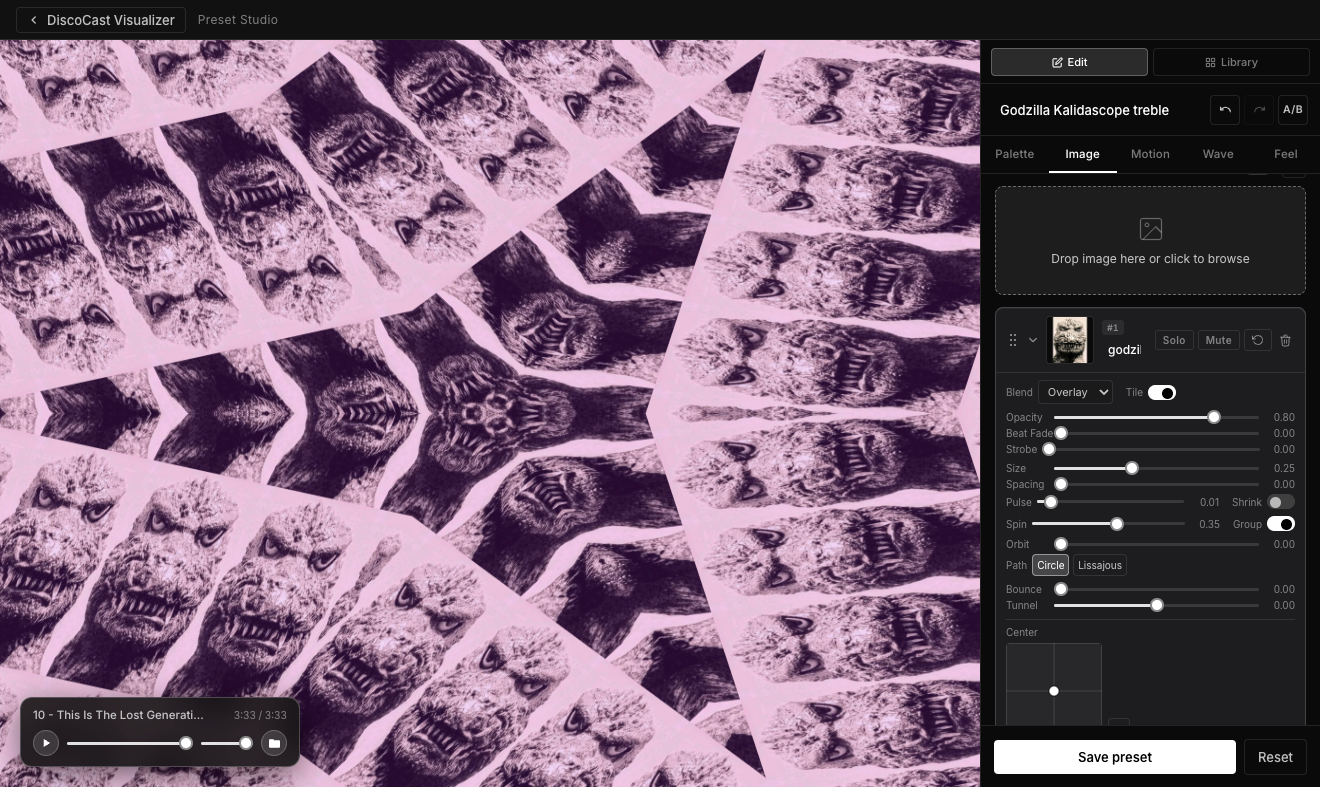
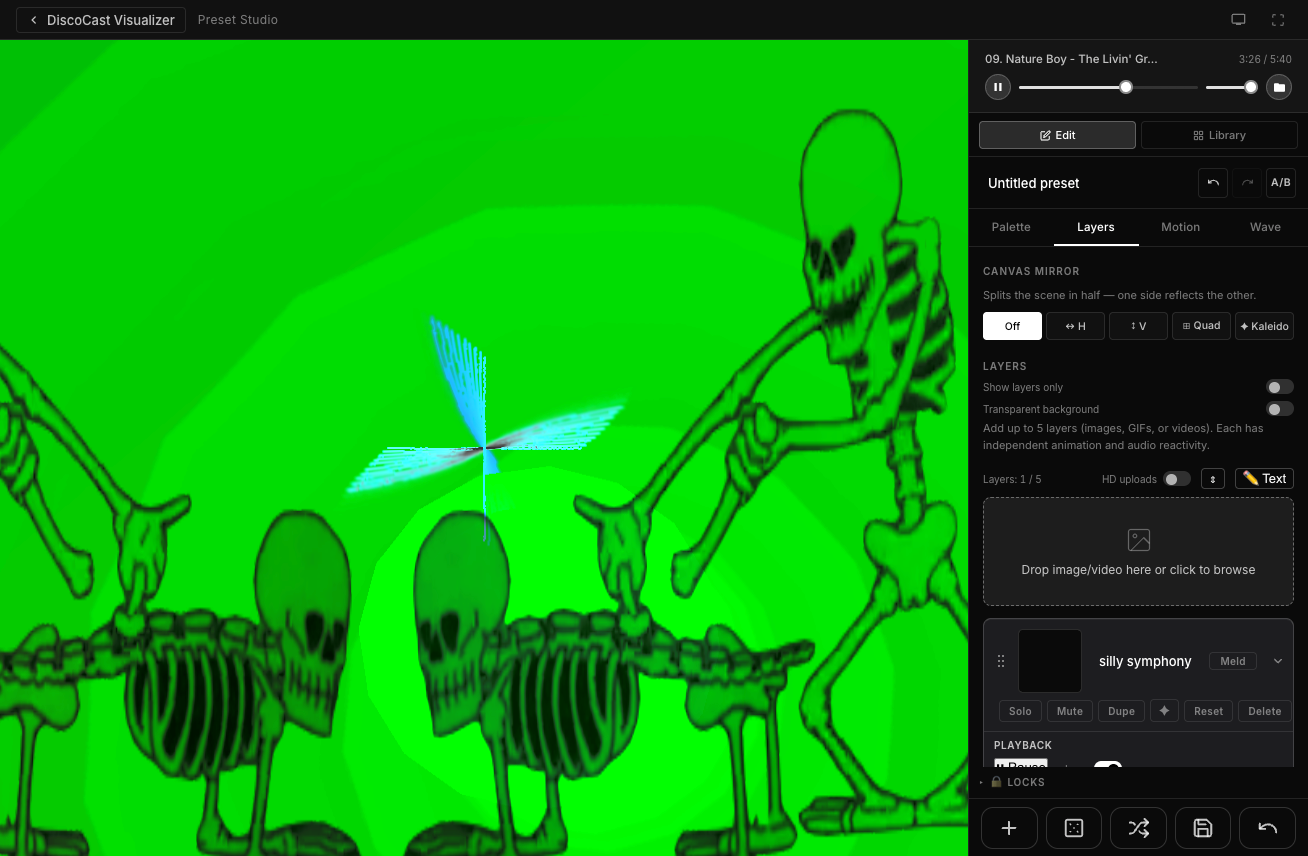
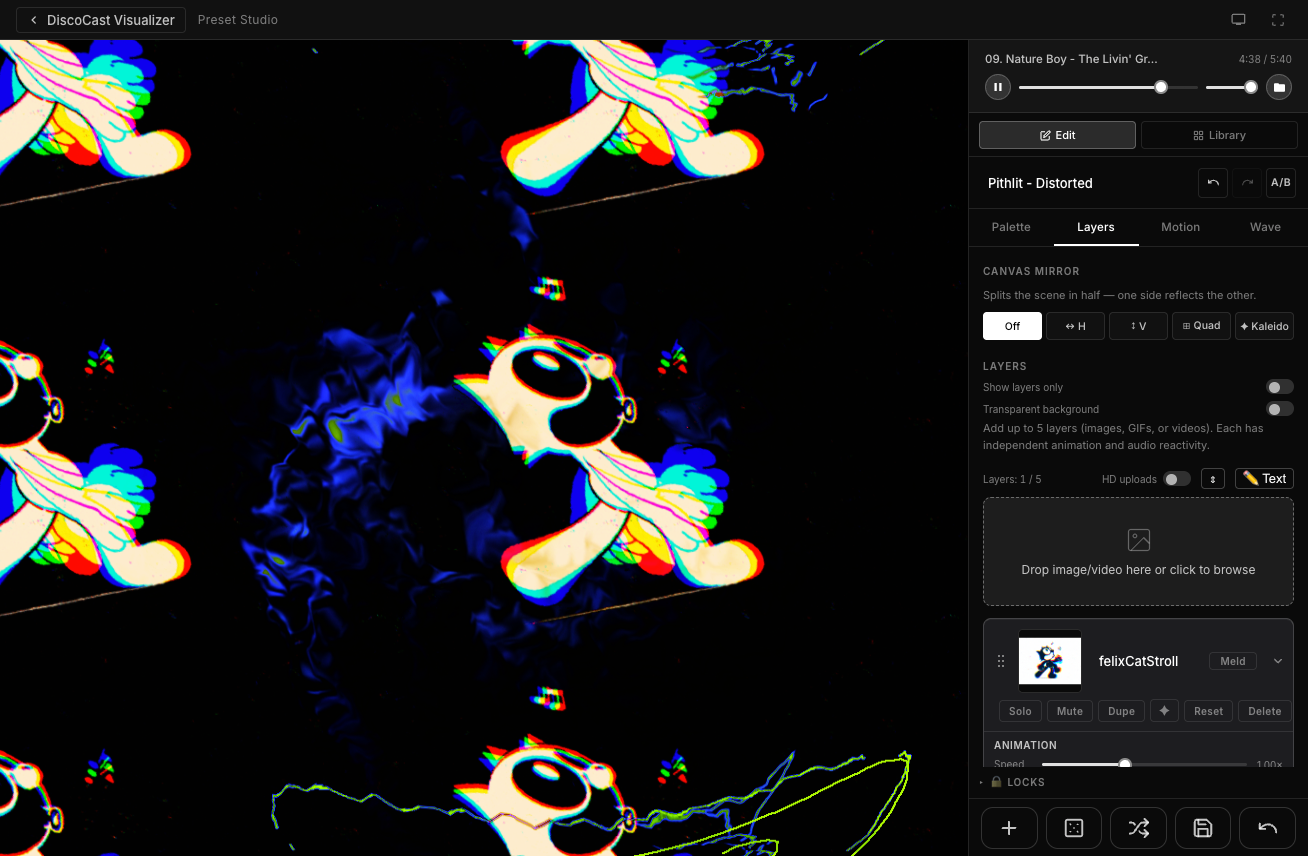
Preset Studio editor showing custom visual controls and image layers Preset Studio - custom visual example Preset Studio - custom visual example

Make your own visuals

Build custom presets from scratch with a live canvas and a tabbed inspector. Pick a palette, shape the motion, then add your own images and wire every layer to the music independently.

  • Palette Opacity - fade the MilkDrop background to black so only your layers show; designed for multi-zone compositing in the Timeline Editor
  • Transparent Background - Show layers only + Transparent background make the whole canvas truly see-through (not black) so layers float on nothing - the foundation for stacking presets over each other in the Timeline
  • 12 one-click palettes · 3 independent color swatches (Wave / Glow / Accent) · per-preset Saturation, Hue Rotate, and brightness toggles
  • Up to 5 layers per preset - images, video (MP4/WebM), animated GIFs, or text - each with independent motion, effects, and audio reactivity
  • Motion Audio Reactivity - add Pulse, Bounce, Shake, Beat Fade, Strobe, Tilt, Hop, Hue Pulse, Blur Pulse, or Squash to any layer via Source + Curve controls
  • From-scratch creation tools - a Motion Engine (Breathe / Sway / Spin with Speed + Depth) for living motion, Custom Shapes (up to 4 placement-first polygons/rings with their own motion + audio reactivity + trail), and a Colors harmony-aware random palette roll
  • Video layers - play/pause, loop, speed (0.25×–4×), scrub bar, 12-control color grading (Brightness, Contrast, Gamma, Fade, Temp, Sepia, Blur, Shadows, Highlights, Lift, Gain, Tint M/G); the entire VJ effects suite applies to every frame
  • 50-deep undo/redo · A/B comparison · Focus mode (\ key)
  • Export presets as portable files - images and all layer data included, no data lost

Layer Types - up to 5 per preset

Every layer type - image, video, GIF, or text - runs through the same full effects pipeline. Motion, transforms, audio reactivity, color grading, and blending are independent per layer, so you can stack and mix anything exactly how you want.

Video
MP4 & WebM - rendered as real-time GPU textures at up to 720p
Transparent WebM - drop a video with an alpha channel (Sammie Roto cutouts, animated logos) and the subject floats over the visualizer; macOS auto-converts on first import
Playback - play/pause, loop toggle, speed (0.25×–4×), scrub bar
Color grading - 12 controls: Brightness, Contrast, Gamma, Fade, Color Temperature, Sepia, Blur, Shadows, Highlights, Lift, Gain, Tint M/G
Scale 10%–200% coverage · Mirror (H / V / Quad / Kaleidoscope)
Tile & Grid - Density or explicit Cols×Rows, full per-cell stack (Offset, Cell Rotate, Popcorn, variance, Seed); works on transparent video
Width & Height - independent non-uniform scaling (0.25×–4×) per axis
Border - colored ring outside video edge (width, color, feather)
All VJ effects - Spin, Orbit, Wave Distort, Chromatic Aberration, Pixelate, Scan Lines, Film Grain, Luma Key, Invert, Threshold
Audio-reactive - Bass/Mid/Treble-driven Pulse, Bounce, Beat Fade, Shake, Strobe
Motion
Spin - per-tile or whole-image rotation speed
Orbit - circular or Lissajous path (figure-8, clover)
Bounce - bass-driven upward displacement on every beat
Beat Shake - random UV impulse on kick, scales with audio
Sway - sinusoidal horizontal pendulum
Wander - organic dual-sine drift that never repeats
Pan - Drift (endless scroll) or Bounce (ping-pong)
Tunnel - seamless zoom-through with per-layer depth offset
Transform
Size with audio-reactive pulse
Angle - static rotation offset
Skew X / Y - 2D shear transform
Perspective X / Y - projective warp to vanishing point
Tile Width / Height - independent cell shape
Aspect: Lock / Fluid - Lock (default) holds the layer's true shape on any canvas; resizing or going full screen reveals more of the scene instead of stretching. Fluid = legacy canvas-adaptive. Portrait, square & landscape tile without distortion
Radius - SDF rounded-corner blend on tile edges
Per-Cell Offset - stagger alternating rows or columns (classic brick / half-drop pattern)
Cell Rotate - random rotation per tile, with optional 90° snap for a Truchet-style mosaic
Popcorn - per-cell audio pulse; individual tiles dance on different beat phases
Size Var - procedural per-cell size variance; every tile a slightly different scale
Jitter X / Y - per-cell position scatter; tiles break free of the grid, drifting past their cells and overlapping each other
Opacity Var - per-cell opacity variance; each tile fades to its own level
Seed - reshuffle or lock the procedural per-cell random pattern
Grid mode - explicit Cols×Rows grid as an alternative to density-driven tiling
Fill / Fit - stretch the image to each grid cell, or preserve its aspect with transparent padding
Grid Scale - zoom the whole grid: smaller with a margin, or larger than the canvas for a zoom-in
Subdivide - split every grid cell into an inner sub-grid for a recursive grid-within-a-grid
Outer Gap - open wide channels between the outer cells so the sub-grids read as separate clusters
Visual Effects
Chromatic aberration - animated RGB channel split
Tint + Hue Spin - color wheel animation
Saturation - 0 = greyscale → 1 = original → 2 = hyper-vivid
Hue Rotate - shift image hue independently of the palette (0–360°)
Brightness / Contrast / Gamma - exposure, punch, midtone curve
Fade - lift black point for a faded film look
Color Temperature - warm/cool shift (−15% per channel)
Sepia - blend toward classic warm sepia tone
Blur - 5-tap soft blur (pairs with Additive blend for glow)
Shadows / Highlights - luma-weighted dark & bright area control
Lift / Gain - shadow bias & highlight boost (professional grading)
Tint M/G - magenta/green color balance axis
Mirror - H / V / Quad / Kaleidoscope (per-tile or whole)
Canvas Mirror - folds the entire scene
Posterize - 2 / 4 / 8 / 16 color quantize steps
Edge / Sobel - luminance gradient outline effect
Luma Key - cut out darks or lights by brightness threshold
Wave Distort - sinusoidal UV warp, audio-reactive amplitude
Invert - color negative blend (0 = normal, 1 = fully inverted)
Threshold - binary B&W with audio-reactive cutoff
Pixelate - retro mosaic blocks, adjustable resolution
Scan Lines - CRT-style horizontal dark bands
Film Grain - animated noise overlay for analog texture
Strobe - hard binary opacity cut on beat threshold
Blend mode - Overlay / Additive / Multiply
Screen Overlay - per-layer colored shape (rectangle → ellipse) drawn over the canvas with position, size, feather, strength, and color. Composites in layer order so layers above always sit on top
Audio Reactivity
Source - Bass, Mid, Treble, Volume, or Flux per layer
Curve - Linear, Squared, Cubed, or Gate shaping
Opacity Pulse - audio-reactive fade independent of base opacity
Pulse / Bounce / Shake / Beat Fade / Strobe - size, lift, jolt, fade, and hard strobe-cut on the beat
Tilt - snap-rotate ±15° on beat, with a ←/→ direction chip
Hop - directional left/right kick on beat; the sideways cousin of Bounce
Hue Pulse - the layer's hue jumps on every beat, on top of any Hue Spin
Blur Pulse - cinematic focus pull; blurs on the hit, sharpens between
Squash - cartoon squash-and-stretch on beat (Wide flattens, Tall stretches)
All motion + effects driven by same audio signal
Text Layers
Fonts - Inter (variable), Roboto, Oswald (400 & 700 weight)
Typography - size (24–200px), weight, letter spacing, line height, alignment, color
Effects - drop shadow (blur, X/Y, color) and outline (width, color)
All transforms - tile, spin, mirror, orbit, bounce, hue spin, audio reactivity
Two size controls - Typography Size (glyph scale) and Blend Size (tile density)
Saved with preset - text content and all settings persist on export/import
Animated GIF
Perceptual speed - 0.25×–8× log-curve control; consistent feel across fast and slow GIFs
Alpha Mode - Fade (blend) or Preserve Silhouette (cutout)
Timing Stability - 0–1 variance smoothing for choppy source files
GIF Optimizer - frame reduction, resize, and GPU savings preview before adding to preset
Layer Animation
Animate button on every layer card opens a focused, draggable floating modal - the canvas stays live behind it while you tune
Entrance - Fade, Scale Up, Scale Down, Slide L/R/U/D, Pop, Blur; auto-fires whenever a preset loads
Exit - same chip set with mirrored end-states; plays when the layer is removed (the delete waits for the tween)
Idle - continuous loop while the layer is visible: Float (vertical bob), Pulse (scale breathing), Sway, Spin, Drift, Breathe (opacity)
Contextual params - each preset reveals one tunable: Slide = Distance, Scale = Start size, Pop = Pop from, Blur = Start blur
Visual duration scrubber - custom drag handle, tick marks, live readout, keyboard-arrow nudging (0.1–10s for entrance / exit; 0.25×–4× for idle speed)
Ease bezier preview - chip row + live SVG curve that samples the actual ease, so elastic / bounce / back overshoots draw correctly. Entrance: Smooth / Snappy / Spring / Bounce / Linear. Exit: Smooth / Snappy / Linger / Wobble / Linear
▶ Preview button replays the tween on the live canvas without committing - tune duration, ease, or chip and re-preview cleanly
Enter at - m:ss scrubber (0:00–3:00) on the Entrance tab; layer holds invisible until its scheduled time, then the entrance tween fires
Exit at - m:ss scrubber on the Exit tab; exit tween fires at the chosen moment; stagger five layers for a cinematic timed reveal sequence
Plays live in the player & timeline - entrance, idle, and timed schedules all run during real playback; cross-fades between presets respect the animation state
Composes with audio reactivity - animation is "when"; reactivity is "how it behaves moment-to-moment." Both run independently on the same layer
Accent dot on the button when any animation is active - see at a glance which layers are animated
Motion Presets
Six one-click motion looks at the top of the Motion tab: Vortex, Calm Drift, Earthquake, Tunnel In, Spin Lock, Hyperspace
↺ Reset button snaps all motion parameters back to defaults in one click
Wave Audio Reactivity
Source + Curve + Size / Opacity / Shape / Orbit sliders drive the wave overlay from any audio band
Per-slider source pill - e.g. bass pumps wave size while treble morphs shape, independently
Palette Workflow
Hover any of the 12 chips to preview colors live on the canvas before committing
Lock individual channels (Wave / Glow / Accent) to protect them from palette changes
"+ Save current mix" pins your active triplet as a 13th "My Mix" chip
Random & Remix
Redesigned icon footer - five big buttons: + New, Random, Remix, Save, ↺ Reset
Random loads any of the 1,144-preset library straight into the Studio as your editing base
Remix (formerly Surprise) rolls a coherent random variation + palette + motion + wave in one click
Double-click any slider label to reset it to its default value
Wave Thickness, Fill & Rotation
Thickness - continuous 0–8 slider replaces the old on/off toggle; scales the wave from hairline to bold
Fill - 0–1 slider fills the wave into a broad shape (a pulsing disc on round modes, a solid wedge on line modes); the value also sets fill opacity
Rotation - ±180° slider spins the wave shape around its own anchor
All apply to every shape mode including Ripple, and compose cleanly with the Wave Reactivity panel
Shipped via a vendored fork of the Butterchurn engine
Motion Engine
Living, time-driven motion at the top of the Motion tab - a from-scratch preset evolves instead of sitting on a frozen snapshot
Breathe - hypnotic pulsing zoom in and out
Sway - the warp centre drifts in a slow Lissajous, so the scene stops radiating dead-centre
Spin - gentle rocking rotation
Two knobs - Speed + Depth - shape any engine; sits alongside the six static Motion Presets
Plays live in the player & timeline, and layers on top of any bundled preset's own motion
Custom Shapes
Place up to 4 geometric shapes from scratch - polygons and rings, each on its own card in the Wave tab
Drag an XY-pad to position; set Size, Sides (triangle → circle), Angle, Opacity
Fill colour, Border on/off + colour, and Glow (additive blend)
Motion - per-shape Spin & Orbit (time-driven)
Reactivity - Source + Curve + Size / Opacity / Spin / Shake / Sides, each with its own per-slider source pill
Trail - from crisp (no trail) to long echoes
Render over the feedback presets and over a flat Solid/Shift background; play identically in the player & timeline
Colour Roll
One click rolls a harmony-aware random scheme - never just three random RGBs
Colour-theory rules - complementary, analogous, triadic, split-complementary, monochrome - so every roll looks intentional
Respects your per-channel locks: lock a colour you love and reroll the rest
The foundation of a growing Colour Studio (rule picker, hue control, gradients, mood presets to come)

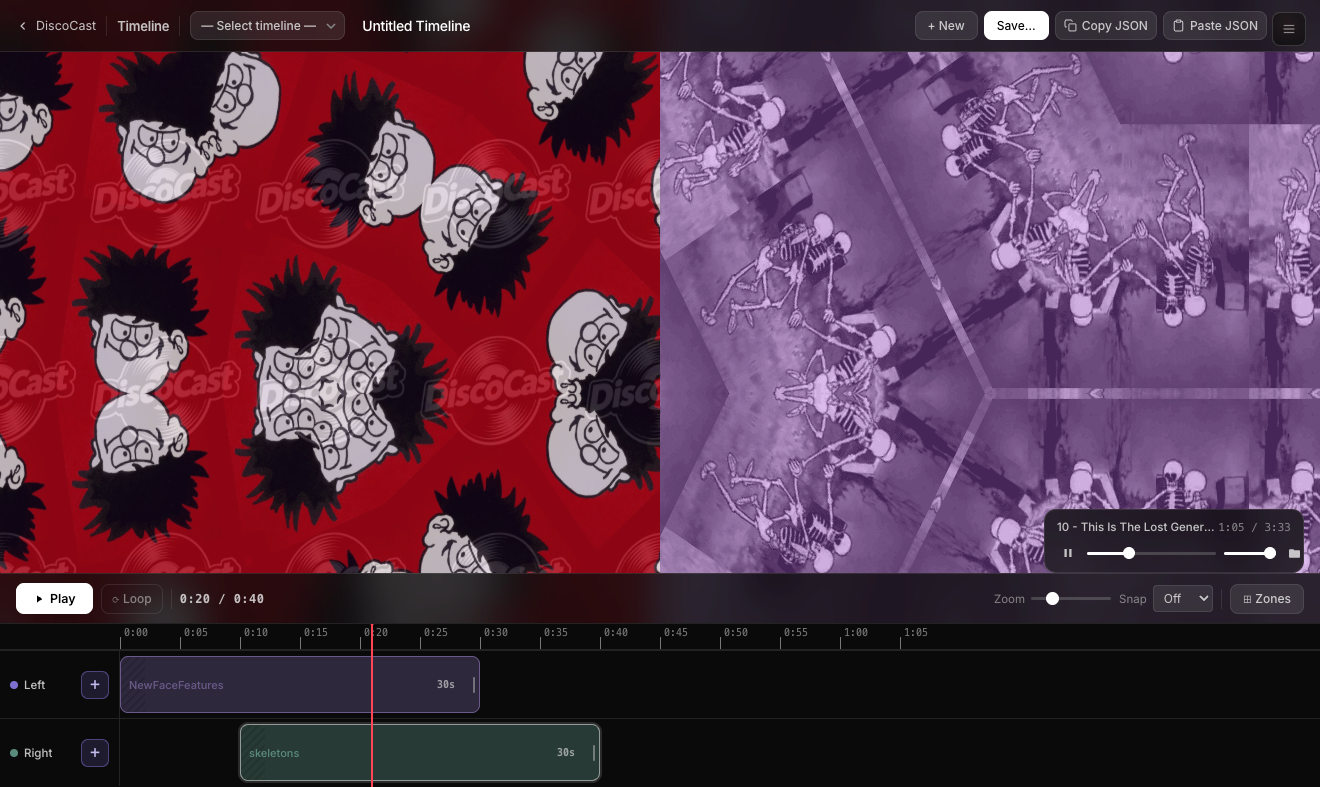
Timeline editor showing preset sequencing and zone compositor Timeline editor showing block transitions and loop regions Timeline editor showing zone compositor and multi-track layout

Plan a whole show

Arrange presets on a multi-track strip, size each block by dragging, then hit play. The Zone Compositor lets you run multiple presets in different screen regions simultaneously - each with its own opacity and blend mode.

  • Real-time live editing - drag, resize, edit, duplicate, or delete blocks while the timeline is playing; changes take effect instantly with no flash
  • Double-click to cue - double-click any block to crossfade into it and seek the playhead to its start; instant live VJ control
  • Per-block menu - a hamburger icon opens a compact action menu: a Transition picker, a 16-colour block colour picker, Duplicate, and Delete
  • Block transitions - set how each block enters: Fade (crossfade), dip through Black or White, or a hard Cut - a creative choice per block
  • Markers & loop regions - press M or click the dedicated marker lane to drop a marker; set one to Loop and it becomes a draggable loop region that wraps playback with a 1-second crossfade
  • Multi-track strip - resize any block to any length (the strip auto-scrolls as you drag), drag-to-reorder, snap-to-grid, BPM grid overlay
  • Stack tracks inside any zone - Full Screen gets a transport-row + Add Track; Left/Right, Quadrants, Center+Frame, and Top Banner each get an inline + Track button on the zone's front-layer row. Up to 4 tracks per zone, each a real engine
  • Top row = front layer - Photoshop convention; strip reads like the composite. New tracks land on top with transparent gaps by default, so empty space on an upper track reveals the track beneath instead of painting black
  • Zone Compositor - quadrant, banner, center square, custom rectangle
  • Per-zone controls - opacity, blend mode (Screen / Overlay / Multiply / Add), and gap behavior
  • Per-zone output routing - one ▸ chip on each zone's foundational row picks the display for every track in that zone; stacked zones expose per-track blend mode + opacity in the Outputs panel for fine-grained compositing on the output window (browser version today; coming to the desktop app)
  • Stack transparent presets - a transparent-background preset on a zone reveals the zone beneath it (true per-pixel alpha), so a cutout or logo composites over a full-screen visual
  • Fullscreen mode - F key hides all controls for clean projection
  • Export as .dcshow.json bundle - custom presets and images travel with the file

Your work travels with you

Every preset you build - including image layers - can be exported to a single file and imported on any machine running DiscoCast. No cloud, no sync, no lost work.

Preset Export / Import

Export a single preset or your entire library as a .json file. Images are embedded as base64 - open the file on another Mac and everything is exactly as you built it.

Show Bundle Export

Export a timeline as a .dcshow.json bundle. All custom presets and their images are embedded - hand the file to another DJ and they can run your exact show.

Import Result Feedback

After any import, a modal lists exactly what was restored by name - and flags anything that didn't make it, with the reason why.


Keyboard controls reference showing all shortcut keys

Keyboard Controls

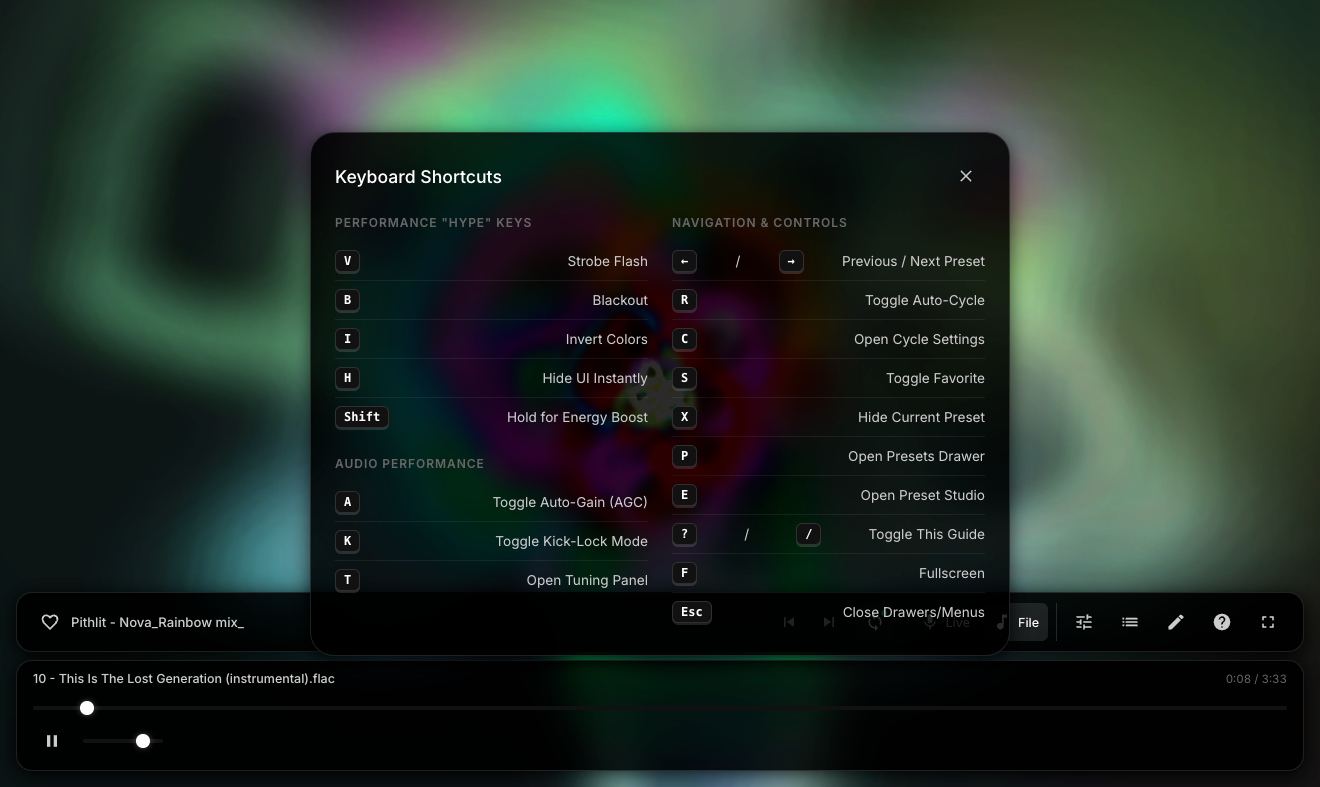
The whole UI is designed to stay out of your way - glassmorphic controls auto-hide after 3 seconds, and every action has a keyboard shortcut. No menus to dig through.

  • Live hype keys - strobe, blackout, invert, and Shift for 2× boost
  • Audio tuning - AGC and Kick-Lock toggle with one key
  • Preset nav - arrows, random, favorites, hide unwanted presets
  • Zen Mode - press H to hide all UI for clean projection
  • Quick launch - E for Preset Studio, L for Timeline Editor

Download

Version 0.9 (Beta) · Oct 12, 2026
Free download of early beta for macOS and Windows. Mac users: open the .dmg, drag the app to Applications. Windows users: run the .exe installer.

macOS 10.15+ · Tauri · Butterchurn WebGL 2
Windows 10/11 · Run the .exe to install